Validate ZUGFeRD or XRechnung
Checks whether an e-invoice is valid: a ZUGFeRD / Factur-X PDF or an XRechnung XML (CII or UBL). For a PDF it checks the PDF/A-3 conformance and the embedded invoice XML; for every invoice the profile, the schema, the EN 16931 business rules and, for an XRechnung, the German XRechnung rules. Returns whether it is valid, the detected profile, and the errors and warnings found. An invalid invoice is returned as a result with the list of findings, not as an error.
 Validate ZUGFeRD or XRechnung
Show advanced options
How it works
Send an e-invoice as PDF (ZUGFeRD / Factur-X) or as XML (XRechnung, CII or UBL). The action checks the PDF/A-3 format, the embedded XML, the profile, the schema, the EN 16931 business rules and, for an XRechnung, the German XRechnung rules (BR-DE). An invalid invoice is not an error: you get a result with Is Valid = false and the list of findings. One check takes about 15 seconds.
A typical flow:
- Trigger on an incoming invoice (email attachment or new file).
- Validate ZUGFeRD or XRechnung with the file content.
- Condition on Is Valid: valid invoices go to accounting, for invalid ones send Summary (or Summary (German)) and the Errors back to the sender.
Try it with a sample e-invoice
Download the sample e-invoice (PDF). We created it from our sample invoice. You can create such an e-invoice from your own invoice data with Convert invoice to ZUGFeRD PDF.
Add the action
Below the step that gives you the file, choose + and Add an action, search for ZUGFeRD and select Validate ZUGFeRD or XRechnung.
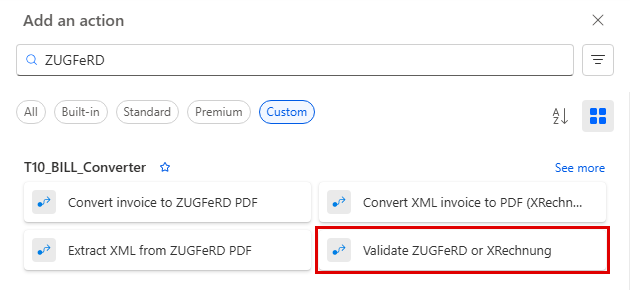
The picture was taken in our test environment. In your flow, the action is part of the connector BILL Converter by Power2Apps.
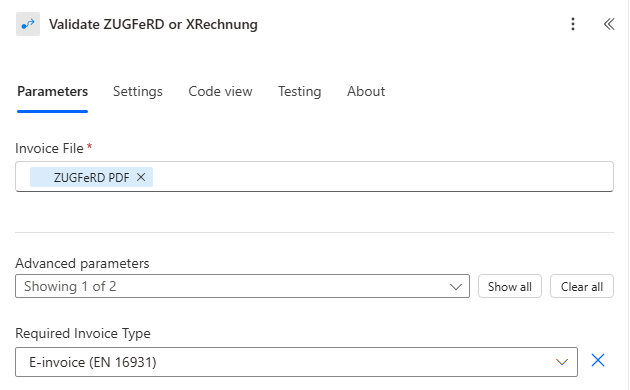
Choose the file and the required type
Put the file content into Invoice File. In our test flow it is ZUGFeRD PDF from the action before. Under Advanced parameters we set Required Invoice Type to E-invoice (EN 16931).
Check the result
Is Valid is true, the profile is EN 16931 and Summary says The invoice is a valid e-invoice (profile EN 16931). Meets Required Type (passed) is true.
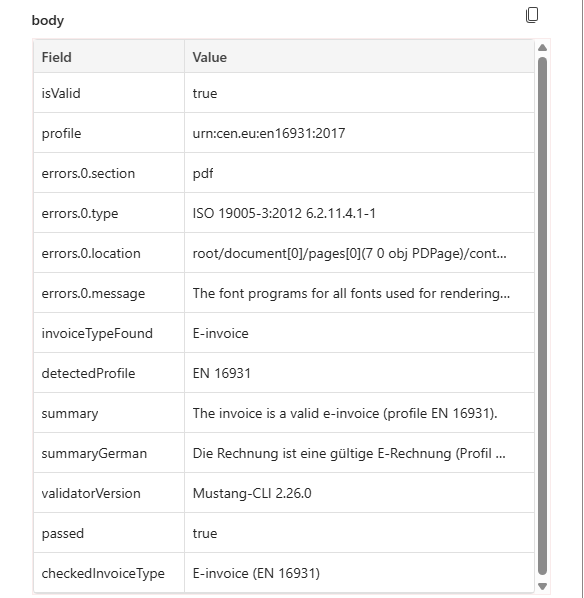
Errors lists one finding in the section pdf: our sample PDF uses a font that is not embedded, which the PDF/A rules do not allow. Findings in the PDF part do not make the e-invoice invalid, because the invoice data in the XML is complete and correct. Findings in the section xml do.
Example: a valid invoice
Request body (invoiceFile is the file content):
{
  "invoiceFile": "<file content>"
}
Response (shortened):
{
  "isValid": true,
  "invoiceTypeFound": "E-invoice",
  "detectedProfile": "Extended",
  "detectedSyntax": "cii",
  "xrechnung": false,
  "summary": "The invoice is a valid e-invoice (profile Extended).",
  "errors": []
}
Example: an invalid invoice without VAT ID
An XRechnung with the standard VAT rate, but without the VAT ID or tax number of the seller. Every finding names the rule (here BR-S-02 and BR-DE-16), the business terms concerned (BT-31, BT-32) and in location the place in the XML. Summary (German) can go to the sender as it is.
{
  "isValid": false,
  "invoiceTypeFound": "Invalid e-invoice",
  "detectedProfile": "XRechnung",
  "detectedSyntax": "cii",
  "xrechnung": true,
  "summary": "The invoice is meant to be an e-invoice (profile XRechnung) but has 3 errors. Send the sender the errors listed in this check.",
  "summaryGerman": "Die Rechnung soll eine E-Rechnung sein (Profil XRechnung), hat aber 3 Fehler. Senden Sie dem Absender die Fehler aus dieser Prüfung.",
  "errors": [
    {
      "section": "xml",
      "location": "/*:CrossIndustryInvoice[…]/*:IncludedSupplyChainTradeLineItem[…][1]/*:SpecifiedLineTradeSettlement[…]/*:ApplicableTradeTax[…]",
      "message": "[BR-S-02]-An Invoice that contains an Invoice line (BG-25) where the Invoiced item VAT category code (BT-151) is \"Standard rated\" shall contain the Seller VAT Identifier (BT-31), the Seller tax registration identifier (BT-32) and/or the Seller tax representative VAT identifier (BT-63). …"
    },
    {
      "section": "xml",
      "location": "/rsm:CrossIndustryInvoice",
      "message": "[BR-DE-16] Wenn in einer Rechnung die Steuercodes S, Z, E, AE, K, G, L oder M verwendet werden, muss mindestens eines der Elemente \"Seller VAT identifier\" (BT-31), \"Seller tax registration identifier\" (BT-32) oder \"SELLER TAX REPRESENTATIVE PARTY\" (BG-11) übermittelt werden. …"
    }
  ]
}
The response is shortened: BR-S-02 comes once for each invoice line. The messages are the wording of the validator: the EN 16931 rules in English, the German XRechnung rules (BR-DE) in German. Summary and Summary (German) are always there in both languages.
What the result tells you
Invoice Type Found sorts the invoice:
- E-invoice: a structured e-invoice (profile Basic, EN 16931, Extended or XRechnung) without errors in the XML.
- Booking aid: profile Minimum or Basic WL. These files do not contain all invoice data and do not count as an e-invoice in Germany.
- Other invoice: no invoice XML found, or an old or unknown format such as ZUGFeRD 1.0.
- Invalid e-invoice: meant to be an e-invoice, but with errors in the XML.
Errors make the invoice invalid, except findings in the section pdf (see above). Warnings do not make it invalid. An example is the arithmetic check: if the amounts in the XML do not add up to the cent, the invoice stays valid and you get a warning like this one:
{
  "isValid": true,
  "warnings": [
    {
      "section": "xml",
      "message": "Arithmetical issue:Payable total in XML is 1550.34, but calculated total is 1550.35 with tax basis 1732.00 and with positions 1769.50 = 1200.00 + 89.50 + 480.00 and rounding amount 0.00"
    }
  ]
}
Your own requirements
With Additional Required Field you name fields the invoice must contain: one BT/BG number or German name per row, for example BT-10 (buyer reference) or Bestellnummer. BT-13|BT-14 means one of the two is enough. With Required Invoice Type you demand Any valid invoice, E-invoice (EN 16931) or XRechnung.
{
  "invoiceFile": "<file content>",
  "additionalRequirements": [
    {
      "requiredField": "BT-10"
    },
    {
      "requiredField": "Bestellnummer"
    }
  ],
  "requiredInvoiceType": "XRechnung"
}
Meets Required Type is true only if the invoice has the required invoice type and every additional required field; without Required Invoice Type it stays empty. Missing fields are listed in Unmet Requirements, for example BT-13 when the order number is missing.
Parameters
| Property | Name | Type | Description |
|---|---|---|---|
invoiceFile | Invoice File required | file (base64) | The invoice to check: a ZUGFeRD or Factur-X PDF, or an XRechnung XML. |
additionalRequirements | Additional Required Field advanced | array of DtoZugferdRequiredField | Fields the invoice must contain in addition to the standard. Every row must be present. |
requiredInvoiceType | Required Invoice Type advanced | string (dropdown) | Invoice type the invoice must have to pass, e.g. E-invoice (EN 16931). dynamic dropdown |
Returns
| Property | Name | Type | Description |
|---|---|---|---|
isValid | Is Valid | boolean | Whether the PDF is a valid ZUGFeRD / Factur-X invoice (PDF/A-3, embedded XML, schema and EN 16931 rules) |
profile | Profile | string | Profile of the embedded invoice XML, e.g. urn:cen.eu:en16931:2017; empty if no invoice XML was found |
errors | Errors | array of DtoZugferdValidationMessage | Findings that make the invoice invalid |
warnings | Warnings | array of DtoZugferdValidationMessage | Findings that do not make the invoice invalid |
detectedSyntax | Detected Syntax | string | Syntax of an XML invoice: cii or ubl. Empty for a PDF. |
xrechnung | XRechnung | boolean | True if an XML invoice is an XRechnung. Empty for a PDF. |
invoiceTypeFound | Invoice Type Found | string | E-invoice, Booking aid, Other invoice or Invalid e-invoice. |
summary | Summary | string | One to three sentences you can forward to the sender. |
summaryGerman | Summary (German) | string | The summary in German, to forward to a German-speaking sender. |
passed | Meets Required Type | boolean | True if the invoice has the required invoice type and every additional required field. Empty without Required Invoice Type. |
unmetRequirements | Unmet Requirements | array of string | Additional required fields the invoice lacks, e.g. BT-13 or BT-129 (line 2). |
detectedProfile | Detected Profile advanced | string | Profile of the invoice, e.g. XRechnung or Minimum. Empty without invoice data. |
validatorVersion | Validator Version advanced | string | Validator that checked the invoice, e.g. Mustang-CLI 2.26.0. |
checkedInvoiceType | Checked Invoice Type advanced | string | Required invoice type the check used, e.g. E-invoice (EN 16931). |
Type DtoZugferdRequiredField
| Property | Name | Type | Description |
|---|---|---|---|
requiredField | Required Field required | string (dropdown) | A BT or BG number or German name. Use BT-13|BT-14 for either one. minLength: 1; dynamic dropdown |
Type DtoZugferdValidationMessage
| Property | Name | Type | Description |
|---|---|---|---|
section | Section | string | Part of the check that reported the finding: pdf (PDF/A-3) or xml (invoice XML) |
message | Message | string | Description of the finding, e.g. [BR-02]-An Invoice shall have an Invoice number (BT-1). |
explanation | Explanation | string | Short explanation of the rule, e.g. The seller's VAT ID or tax number is missing (BR-DE-16). Only for common rules; empty otherwise. |
explanationGerman | Explanation (German) | string | The explanation in German, to forward to a German-speaking sender. Only for common rules; empty otherwise. |
type | Type advanced | string | Numeric finding type of the validator |
location | Location advanced | string | Location of the finding in the PDF or XML, if known |
Example request
{
  "invoiceFile": "<base64-encoded file content>"
}
Example generated from the connector definition.