deprecated Convert invoice to ZUGFeRD PDF (deprecated)
This action is deprecated - please use the newer 'Convert invoice to ZUGFeRD PDF' action instead. Creates a fully compliant ZUGFeRD PDF/A-3 invoice by embedding structured invoice data (XML) into a readable PDF. Supports the ZUGFeRD standard (EN 16931) including invoice type codes (partial, prepayment and correction invoices), service periods, preceding invoice references, prepaid amounts, document level discounts and charges, cash discount terms, delivery addresses, payment means and VAT exemptions such as reverse charge.
 Convert invoice to ZUGFeRD PDF (deprecated)
Show advanced options
How it works
You need two things: a readable invoice PDF (for example created from a Word template, an HTML page or your ERP) and the invoice data. The action writes the data as invoice XML (ZUGFeRD 2.3, profile EN 16931) into the PDF and returns a PDF/A-3. People read the PDF as usual; accounting software reads the embedded XML.
A typical flow:
- Get or create the readable PDF, for example with Get file content (SharePoint, OneDrive) or by converting a Word template to PDF.
- Convert invoice to ZUGFeRD PDF (deprecated) with the invoice data from your list, Excel table or ERP.
- Save ZUGFeRD PDF with Create file or attach it to an email.
- Optional: check the result with Validate ZUGFeRD or XRechnung.
Try it with the sample invoice
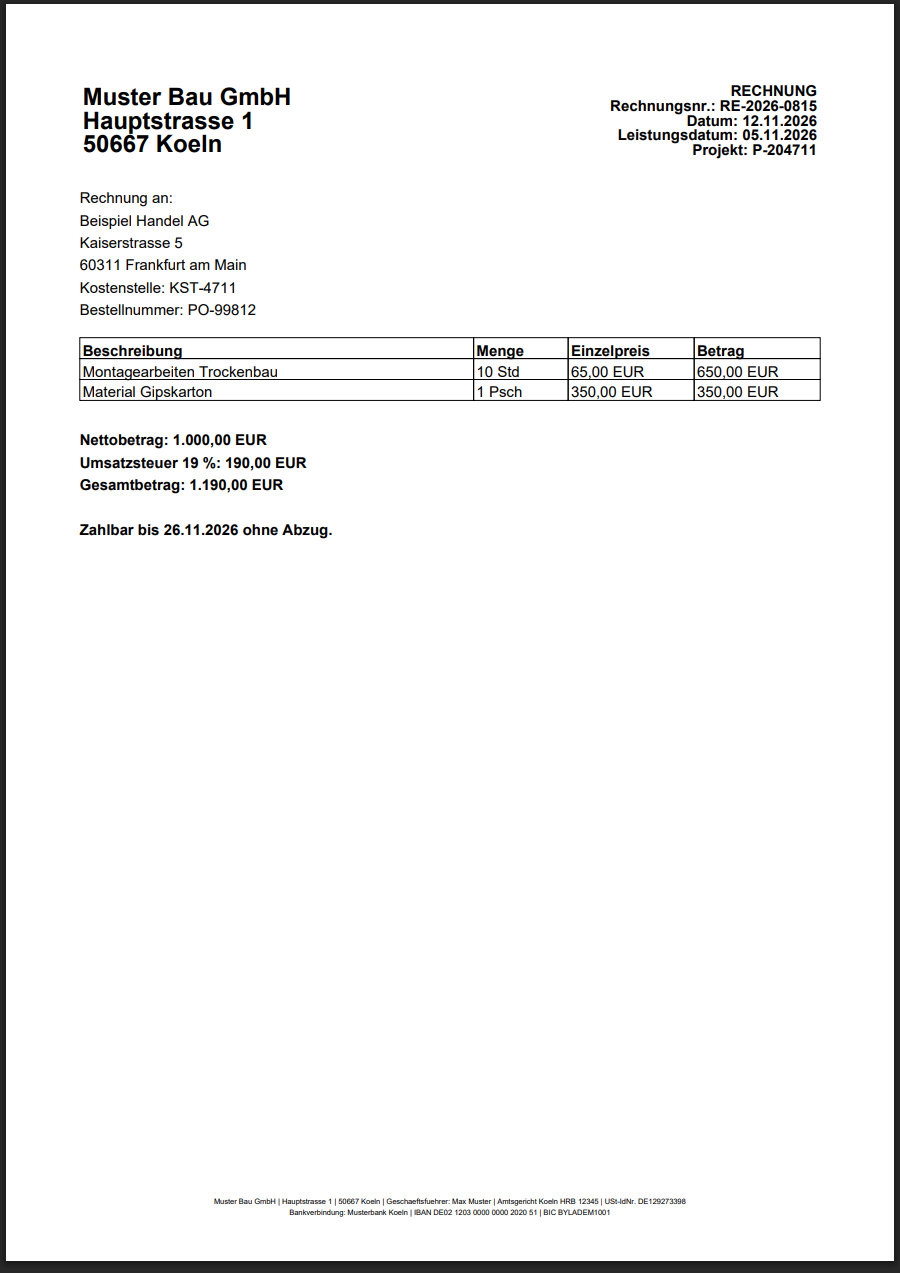
Download the sample invoice (PDF). It is a readable PDF without invoice XML. The steps below turn it into a ZUGFeRD invoice with the data printed on it.
The action in existing flows
This action is deprecated and can no longer be added to a flow: under Add an action the search for ZUGFeRD only offers the newer Convert invoice to ZUGFeRD PDF. In existing flows the action keeps working. Its card still shows the name Convert invoice to ZUGFeRD PDF; the tab About shows the note This action is deprecated. The steps below show such an existing flow with the trigger Manually trigger a flow and a File input called Invoice PDF.
Fill in the invoice data
Put the file content of the trigger into Invoice PDF and enter the data of the invoice: number, date, seller, buyer, bank details and payment terms. In a real flow these values come from your list, Excel table or ERP. Dates are entered with a time, for example 2026-11-12T00:00:00Z, or come from a date column. If you type a plain date such as 2026-11-12, the flow checker shows Enter a valid datetime. Type the date with T00:00:00Z instead, including the Z at the end: a time zone offset such as +01:00 is converted to UTC and can move the date to the day before. The flow checker does not check expressions.
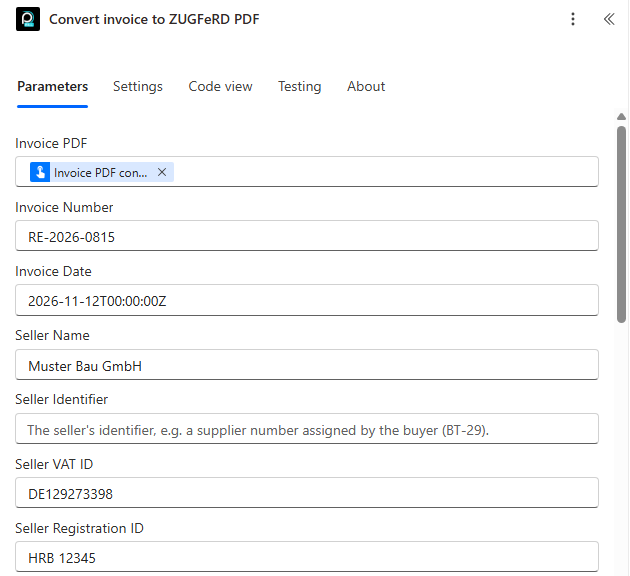
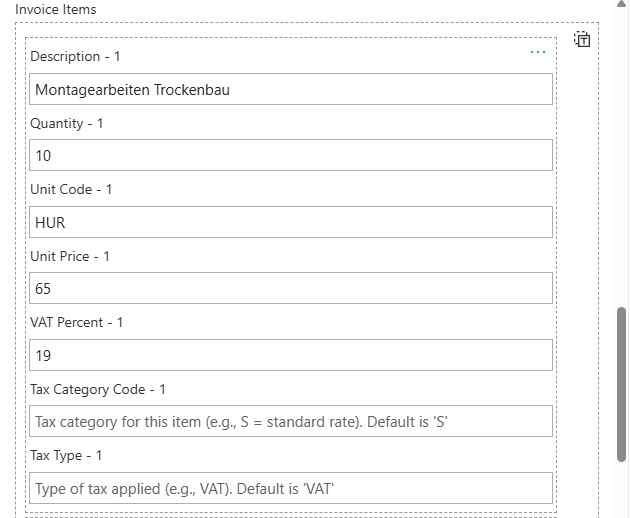
Under Invoice Items every invoice line is one item. The sample has two lines, both with 19 % VAT: 10 hours (HUR) of drywall work at 65.00 and one lump sum (LS) of material at 350.00.
Run the flow and check the result
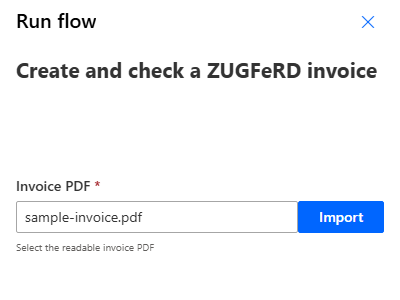
Save the flow, choose Test, then Manually. Select the sample invoice with Import and start the flow with Run flow.
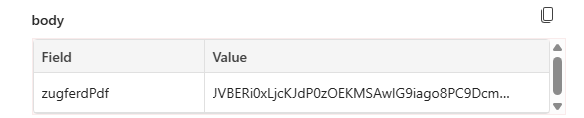
The action returns ZUGFeRD PDF, the file content of the new PDF/A-3 with the embedded invoice XML. Save it with Create file or attach it to an email. Notes is empty here because nothing had to be adjusted.
Download the result (PDF). In our test flow the next action, Validate ZUGFeRD or XRechnung, confirms it as a valid e-invoice with the profile EN 16931.
Example
Request body with two invoice lines (shortened, invoicePdf is the file content of the readable PDF):
{
  "invoicePdf": "<file content>",
  "invoiceNumber": "RE-2025-1001",
  "invoiceDate": "2025-07-01",
  "sellerName": "Power2Apps GmbH",
  "sellerVatId": "DE123456789",
  "sellerStreet": "Hauptstraße 1",
  "sellerPostcode": "10115",
  "sellerCity": "Berlin",
  "sellerCountry": "DE",
  "buyerName": "Max Mustermann GmbH",
  "buyerStreet": "Kundenstraße 99",
  "buyerPostcode": "90402",
  "buyerCity": "Nürnberg",
  "buyerCountry": "DE",
  "iban": "DE89370400440532013000",
  "paymentTerm": "Payable within 14 days",
  "paymentDueDate": "2025-07-15",
  "invoiceLines": [
    {
      "description": "IT consulting",
      "quantity": 8,
      "unitCode": "HUR",
      "unitPrice": 150.0,
      "vatPercent": 19
    },
    {
      "description": "Train ticket",
      "quantity": 1,
      "unitCode": "C62",
      "unitPrice": 89.0,
      "vatPercent": 7
    }
  ]
}
The totals are calculated from the invoice lines: here 8 × 150.00 + 89.00 = 1,289.00 net, plus 228.00 VAT (19 %) and 6.23 VAT (7 %) = 1,523.23 gross. In Power Automate you fill Invoice Items with an array, for example the output of a Select action on your list items.
The response contains ZUGFeRD PDF (the file) and Notes. Notes tell you what was adjusted, for example a converted attachment or an unknown code that was left out.
Tips
- Unit codes (UN/ECE):
C62= piece,HUR= hour,DAY= day,KGM= kilogram,MTR= metre. - Different VAT rates per line are fine; each line has its own VAT Percent.
- Reverse charge (EU B2B): fill Buyer VAT ID and set Tax Category Code
AEwith VAT Percent0on the lines. The exemption reason (VATEX-EU-AE, "Reverse charge") is added automatically. - Public sector (XRechnung): put the Leitweg-ID into Buyer Reference.
- Prepayment, partial and correction invoices: choose the Invoice Type and reference the earlier invoice in Preceding Invoices.
- Cash discount (Skonto): add Cash Discount Terms, for example 2 % within 7 days.
Parameters
| Property | Name | Type | Description |
|---|---|---|---|
invoicePdf | Invoice PDF | file (base64) | The readable invoice PDF into which the invoice XML will be embedded. |
invoiceNumber | Invoice Number | string | The invoice number (e.g., RE-2025-001) |
invoiceDate | Invoice Date | string | The invoice date (format: yyyy-MM-dd) |
sellerName | Seller Name | string | Seller company or person name |
sellerIdentifier | Seller Identifier | string | The seller's identifier, e.g. a supplier number assigned by the buyer (BT-29). |
sellerVatId | Seller VAT ID | string | The seller's VAT ID, e.g. DE129273398 (BT-31). |
sellerLegalRegistrationId | Seller Registration ID | string | The seller's legal registration ID, e.g. a commercial register number (BT-30). |
sellerStreet | Seller Street | string | Seller street address |
sellerPostcode | Seller Postcode | string | Seller postal code |
sellerCity | Seller City | string | Seller city or locality |
sellerCountry | Seller Country | string | Seller country (ISO code, e.g., DE) |
buyerName | Buyer Name | string | Buyer company or person name |
buyerStreet | Buyer Street | string | Buyer street address |
buyerPostcode | Buyer Postcode | string | Buyer postal code |
buyerCity | Buyer City | string | Buyer city or locality |
buyerCountry | Buyer Country | string | Buyer country (ISO code, e.g., DE) |
iban | IBAN | string | Bank account IBAN for payment |
paymentRecipient | Payment Recipient | string | Name of the payment recipient |
paymentTerm | Payment Term | string | Optional payment terms as text, e.g. 'Payable within 30 days' (BT-20). |
paymentDueDate | Payment Due Date | string | Optional date by which the payment is due (BT-9). |
invoiceLines | Invoice Items | array of DtoInvoiceLineV2 | The list of invoice line items. |
invoiceTypeCode | Invoice Type advanced | string (dropdown) | Invoice type (BT-3), e.g. prepayment invoice. Default: Invoice (380) dynamic dropdown |
deliveryDate | Delivery Date advanced | string | Optional actual delivery date (BT-72). Defaults to the invoice date |
servicePeriodStart | Service Period Start advanced | string | Start of the service or billing period (BT-73) |
servicePeriodEnd | Service Period End advanced | string | End of the service or billing period (BT-74) |
currencyCode | Currency advanced | string | Currency code (e.g., EUR, USD) |
businessProcess | Business Process advanced | string | Business process (BT-23). Defaults to the PEPPOL billing process |
buyerReference | Buyer Reference advanced | string | Buyer reference or Leitweg-ID (BT-10), required by German public sector |
buyerOrderNumber | Order Number advanced | string | Purchase order number of the buyer (BT-13) |
contractReference | Contract Reference advanced | string | Contract or framework agreement number (BT-12) |
projectReference | Project Reference advanced | string | Project or construction site reference (BT-11) |
invoiceNote | Invoice Note advanced | string | Free text note on the invoice (BT-22), e.g. legal notes or retention of title |
precedingInvoices | Preceding Invoices advanced | array of DtoPrecedingInvoice | Preceding invoices this invoice refers to (BG-3), e.g. for corrections |
sellerTaxNumber | Seller Tax Number advanced | string | The seller's national tax number (BT-32). Use it if there is no VAT ID |
sellerEmail | Seller Email advanced | string | Seller electronic address (BT-34), e.g. billing email |
sellerContactName | Seller Contact Name advanced | string | Seller contact person name (BG-6) |
sellerContactPhone | Seller Contact Phone advanced | string | Seller contact phone number (BG-6) |
sellerContactEmail | Seller Contact Email advanced | string | Seller contact email address (BG-6) |
buyerVatId | Buyer VAT ID advanced | string | The buyer's VAT ID (BT-48) - required for reverse charge and intra-EU supplies |
buyerEmail | Buyer Email advanced | string | Buyer electronic address (BT-49), e.g. billing email |
buyerContactName | Buyer Contact Name advanced | string | Buyer contact person name (BT-56) |
buyerContactEmail | Buyer Contact Email advanced | string | Buyer contact email address (BT-58) |
deliveryName | Delivery Name advanced | string | Name of the recipient at the delivery location (BT-70) |
deliveryStreet | Delivery Street advanced | string | Street of the delivery address (BG-15), e.g. a construction site |
deliveryPostcode | Delivery Postcode advanced | string | Postal code of the delivery address |
deliveryCity | Delivery City advanced | string | City of the delivery address |
deliveryCountry | Delivery Country advanced | string | Delivery country (ISO code, e.g., DE). Defaults to the buyer country |
bic | BIC advanced | string | Bank identifier code (BIC) |
paymentInfo | Payment Info advanced | string | Optional payment information or reference |
paymentMeansCode | Payment Means advanced | string (dropdown) | How the invoice is paid (BT-81). Default: SEPA credit transfer (58) dynamic dropdown |
skontoTerms | Cash Discount Terms advanced | array of DtoSkontoTerm | Cash discount (Skonto) terms, e.g. 2% if paid within 7 days |
prepaidAmount | Prepaid Amount advanced | number | Amount already paid (BT-113), e.g. from prepayment invoices |
taxExemptionReason | Tax Exemption Reason advanced | string | Reason for VAT exemption (BT-120), e.g. the small business regulation |
taxExemptionReasonCode | Tax Exemption Reason Code advanced | string | VATEX code (BT-121), e.g. VATEX-EU-AE for reverse charge |
documentAllowances | Document Discounts advanced | array of DtoAllowanceCharge | Discounts on document level (BG-20), e.g. a total discount |
documentCharges | Document Charges advanced | array of DtoAllowanceCharge | Charges on document level (BG-21), e.g. freight or packaging |
attachments | Attachments advanced | array of DtoAttachment | Optional additional file attachments to embed in the PDF |
autoAdjustAttachments | Auto-Adjust Attachments advanced | boolean | Automatically converts attachments into allowed e-invoice formats. Default: yes |
Returns
| Property | Name | Type | Description |
|---|---|---|---|
zugferdPdf | ZUGFeRD PDF | file (base64) | The generated ZUGFeRD-compliant hybrid PDF/A-3 invoice file. |
notes | Notes advanced | array of string | Notes about automatic adjustments, for example converted attachments |
Type DtoPrecedingInvoice
| Property | Name | Type | Description |
|---|---|---|---|
invoiceNumber | Invoice Number | string | Number of the preceding invoice (BT-25) |
invoiceDate | Invoice Date | string | Issue date of the preceding invoice (BT-26) |
Type DtoSkontoTerm
| Property | Name | Type | Description |
|---|---|---|---|
days | Days | integer (int32) | Days within which the cash discount applies (e.g., 7) |
percent | Percent | number | Cash discount percentage (e.g., 2 for 2%) |
baseAmount | Base Amount advanced | number | Optional partial amount the cash discount applies to |
Type DtoInvoiceLineV2
| Property | Name | Type | Description |
|---|---|---|---|
description | Description | string | Short description of the invoiced item or service |
quantity | Quantity | number | The quantity of the item (e.g., 1, 5.5) |
unitCode | Unit Code | string | Measurement unit (UN/ECE code, e.g., C62 for piece or HUR for hour) |
unitPrice | Unit Price | number | Net unit price without tax |
vatPercent | VAT Percent | number | Applicable VAT rate for the item (e.g., 19 for 19%). Default is 19 |
categoryCode | Tax Category Code | string | Tax category for this item (e.g., S = standard rate). Default is 'S' |
taxType | Tax Type | string | Type of tax applied (e.g., VAT). Default is 'VAT' |
Type DtoAllowanceCharge
| Property | Name | Type | Description |
|---|---|---|---|
amount | Amount | number | Net amount of the discount or charge as a positive number |
reason | Reason | string | Reason shown on the invoice, e.g. 'Volume discount' or 'Freight' |
vatPercent | VAT Percent | number | VAT rate that applies to this amount (e.g., 19). Default is 19 |
categoryCode | Tax Category Code advanced | string | Tax category (e.g., S = standard rate). Default is 'S' |
taxType | Tax Type advanced | string | Type of tax applied. Default is 'VAT' |
Type DtoAttachment
| Property | Name | Type | Description |
|---|---|---|---|
content | File Content | string | The file content as binary (base64 in JSON) |
filename | Filename | string | Filename with extension (e.g., calculation.xlsx) |
description | Description advanced | string | Optional description of the attachment |
Example request
{
  "invoicePdf": "<base64-encoded file content>",
  "invoiceNumber": "…",
  "invoiceDate": "…",
  "sellerName": "…",
  "sellerIdentifier": "…",
  "sellerVatId": "…",
  "sellerLegalRegistrationId": "…",
  "sellerStreet": "…",
  "sellerPostcode": "…",
  "sellerCity": "…",
  "sellerCountry": "…",
  "buyerName": "…",
  "buyerStreet": "…",
  "buyerPostcode": "…",
  "buyerCity": "…",
  "buyerCountry": "…",
  "iban": "…",
  "paymentRecipient": "…",
  "paymentTerm": "…",
  "paymentDueDate": "…",
  "invoiceLines": [
    {
      "description": "…",
      "quantity": 0.0,
      "unitCode": "…",
      "unitPrice": 0.0,
      "vatPercent": 0.0,
      "categoryCode": "…",
      "taxType": "…"
    }
  ]
}
Example generated from the connector definition.