Detect document type and extract data (AI)
Reads a business document using AI (OCR) and classifies it by document type: invoice or bill, credit note, receipt, delivery note, quote request, or any other document such as an order or contract. It reads PDF files, scans and photos (JPEG, PNG), Word (DOCX) and Excel (XLSX) files and text files such as TXT or CSV. For invoices, credit notes and receipts it also returns the invoice data (seller, buyer, items, totals, payment details). Up to 10 own fields can be read from every document.
 Detect document type and extract data (AI)
Show advanced options
What this action is for
Invoices, credit notes, receipts, delivery notes and quote requests often arrive in the same mailbox or folder. This action handles such a mixed inbox in one step: it tells you what kind of document it is (Document Type) and returns its data at the same time. In your flow, a Switch then sends every document type its own way, for example invoices to accounting and delivery notes to the warehouse.
Try it with the sample invoice
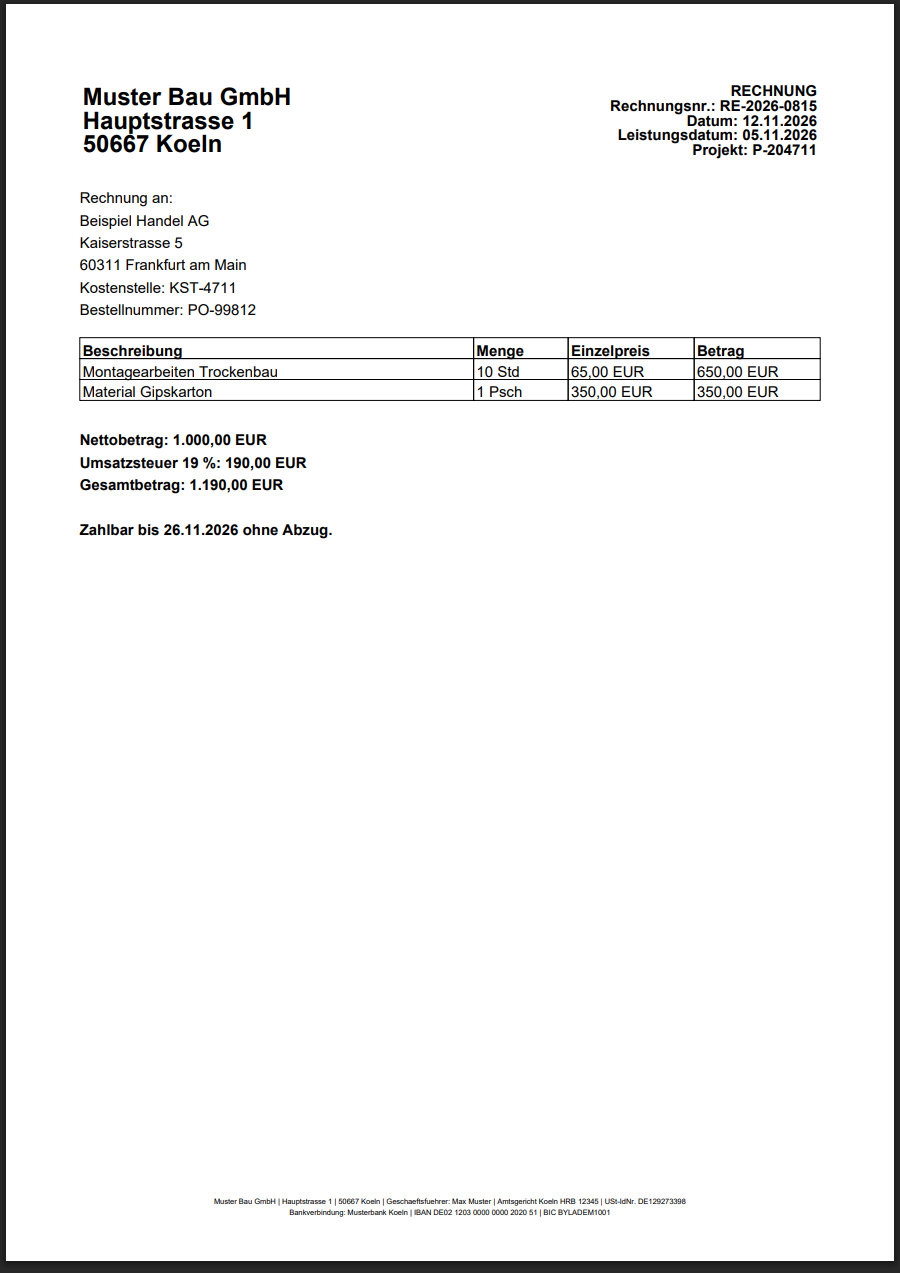
Download the sample invoice (PDF) and try the action in a test flow before you connect your mailbox. The sample has the cost center KST-4711 in the address block.
Add the action
Create an instant cloud flow with the trigger Manually trigger a flow and add a File input; here it is called Document. Below the trigger choose + and Add an action, search for document type and select Detect document type and extract data (AI).
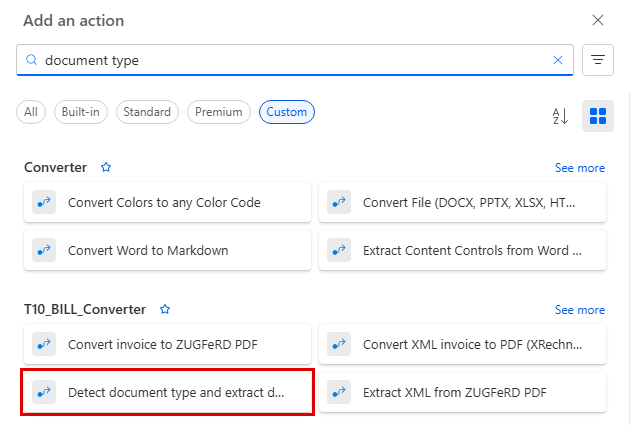
The picture was taken in our test environment. In your flow, the action is part of the connector BILL Converter by Power2Apps.
Choose the file, the hint and your own field
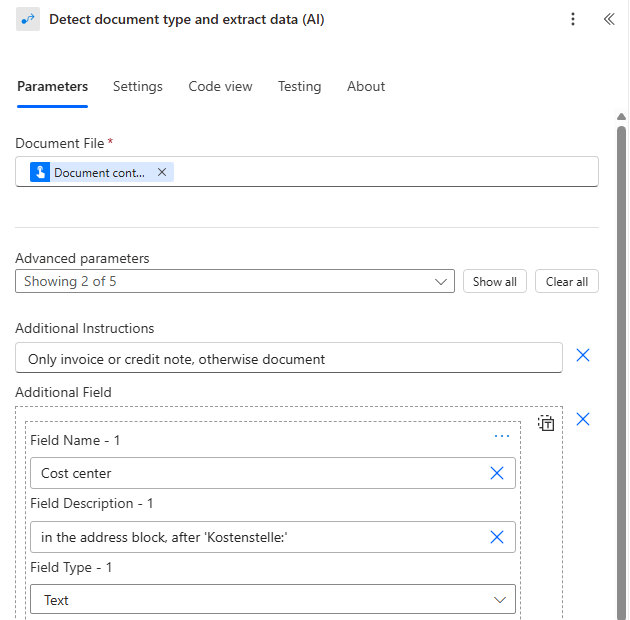
Put the file content of the trigger into Document File: a PDF, JPEG or PNG (scan or photo), an XML e-invoice, or a DOCX, XLSX or text file (for example TXT or CSV in UTF-8). Of a PDF, the AI reads as many pages as your plan allows, at most 50 (free plan: 5); if the PDF has more pages, Notes starts with PagesSkipped. A Word, Excel or text file is read as text, up to 60000 characters (longer text is shortened with the note ContentShortened). Old .doc or .xls files and password-protected Office files cannot be read. Under Advanced parameters choose Additional Instructions and Additional Field (or Show all). In Additional Instructions we write Only invoice or credit note, otherwise document. Under Additional Field we add the field Cost center with the description in the address block, after 'Kostenstelle:' and the type Text.
Run the flow and check the result
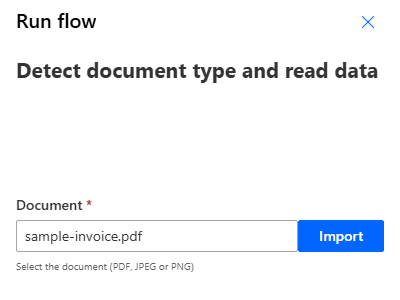
Save the flow, choose Test, then Manually. Select the sample invoice with Import and start the flow with Run flow.
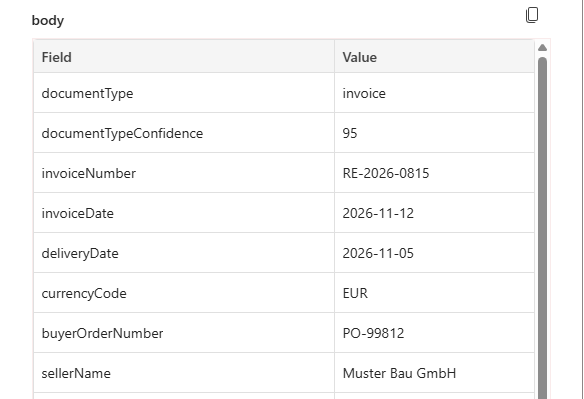
Open the run and the action. In the outputs, Document Type is invoice with a Document Type Confidence of 95, and the invoice fields are filled.
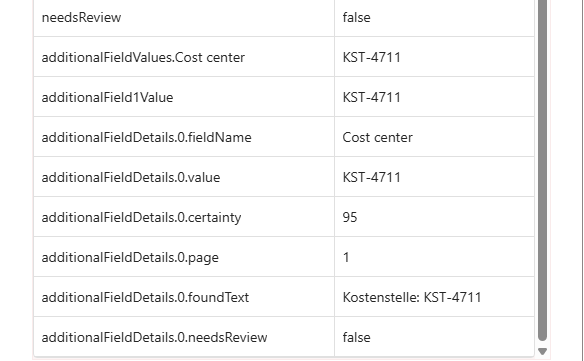
Further down you find your own field: Additional Field 1 Value is the cost center KST-4711, and Additional Field Details shows the certainty, the page and the text it was read from. Needs Review is false.
Step by step: sort the email attachments of a mixed inbox
Step 1: Start the flow with the email attachments
Create an automated cloud flow with the trigger When a new email arrives (V3) (Office 365 Outlook). Under Advanced parameters set Include Attachments and Only with Attachments to Yes.
Any trigger that gives you the file content works as well, for example When a file is created in SharePoint or OneDrive.
Step 2: Add the action
Below the trigger choose + and Add an action, search for document type (or classify) and select Detect document type and extract data (AI) from the connector BILL Converter by Power2Apps. Put Attachments Content into Document File. Power Automate adds an Apply to each around the action by itself, so every attachment is read.
Step 3: Branch by document type
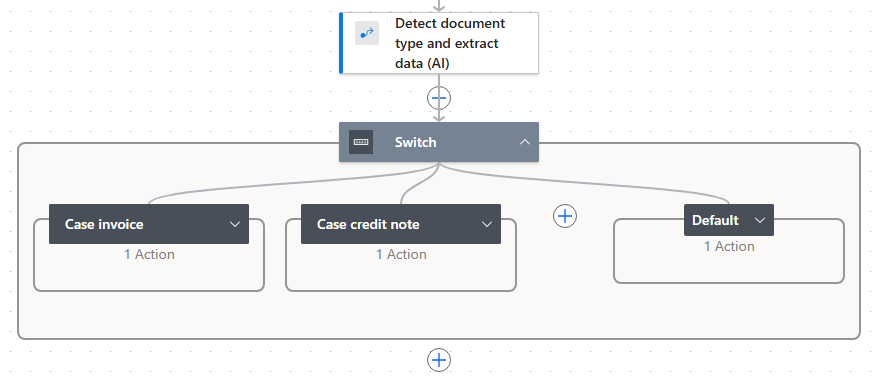
Add the control Switch right after the action. In On, choose Document Type from the action. Then add one case per type. The values must be written exactly like this, in lower case and with a space where shown:
invoice– an invoice that asks for payment. The invoice fields are filled and Ready for E-Invoice is checked.credit note– a credit or refund document. Invoice fields and the e-invoice check as for an invoice.receipt– a till receipt or a proof of payment. Invoice fields are filled, there is no e-invoice check.delivery note– a delivery note or packing slip. No invoice fields; use your own fields, for example the delivery note number.quote request– a request for a quotation. No invoice fields.- Default – everything else. Here Document Type is
document, for example for an order, a contract or a letter. A good default is to forward the document to a person.
In our test flow the hint Only invoice or credit note, otherwise document is set, so two cases and Default are enough:
Steer the document type
Without hints, the action decides the document type itself: invoice, credit note, receipt, delivery note, quote request, or document for anything else. With Additional Instructions you can change that decision for your documents:
- Treat a kind of document as another type, for example
Treat delivery notes with prices as invoice. Such a delivery note then comes back as invoice, with the invoice fields such as amounts, seller and IBAN. - Allow only some types, for example
Only invoice or credit note, otherwise document. Every other document then comes back as document, without invoice fields.
You can write the hints in English or in your own language, up to 2000 characters. Longer hints are shortened, and Notes then starts with InputShortened.
Read your own fields, for example a cost center
Open Advanced parameters and add an item under Additional Field, for example:
- Field Name:
Cost center - Field Description:
in the address block, after 'Kostenstelle:' - Field Type:
Text
The value comes back in Additional Field 1 Value and in Additional Field Values under the key Cost center. Up to 10 own fields are read for every document type, also for delivery notes and for document.
The action does not reject a field that does not fit: more than 10 fields, a field without a name or with a name used twice, an unknown Field Type, Check Type, Review Level or Data Source Mode are handled with the default or skipped, and Notes says so with a code at the start (FieldsLimited, FieldSkipped, FieldNameShortened, FieldTypeDefaulted, CheckTypeIgnored, ReviewLevelDefaulted, AppliesToDefaulted, DataSourceModeDefaulted). The settings of each field are explained on the page of Detect invoice data with custom fields (AI).
A field with Applies To Line is read for every line item of the document, for any document type, for example the items of a delivery note or the rows of a measurement sheet. It comes back in Invoice Items under Additional Field Values of each line; for types other than invoice, credit note and receipt the other invoice fields stay empty. The invoice lines also carry the article number and the line discount, and a missing net unit price is calculated from the line net amount; both are explained on the page of Detect invoice data with custom fields (AI).
Example: the batch number of each item on a delivery note
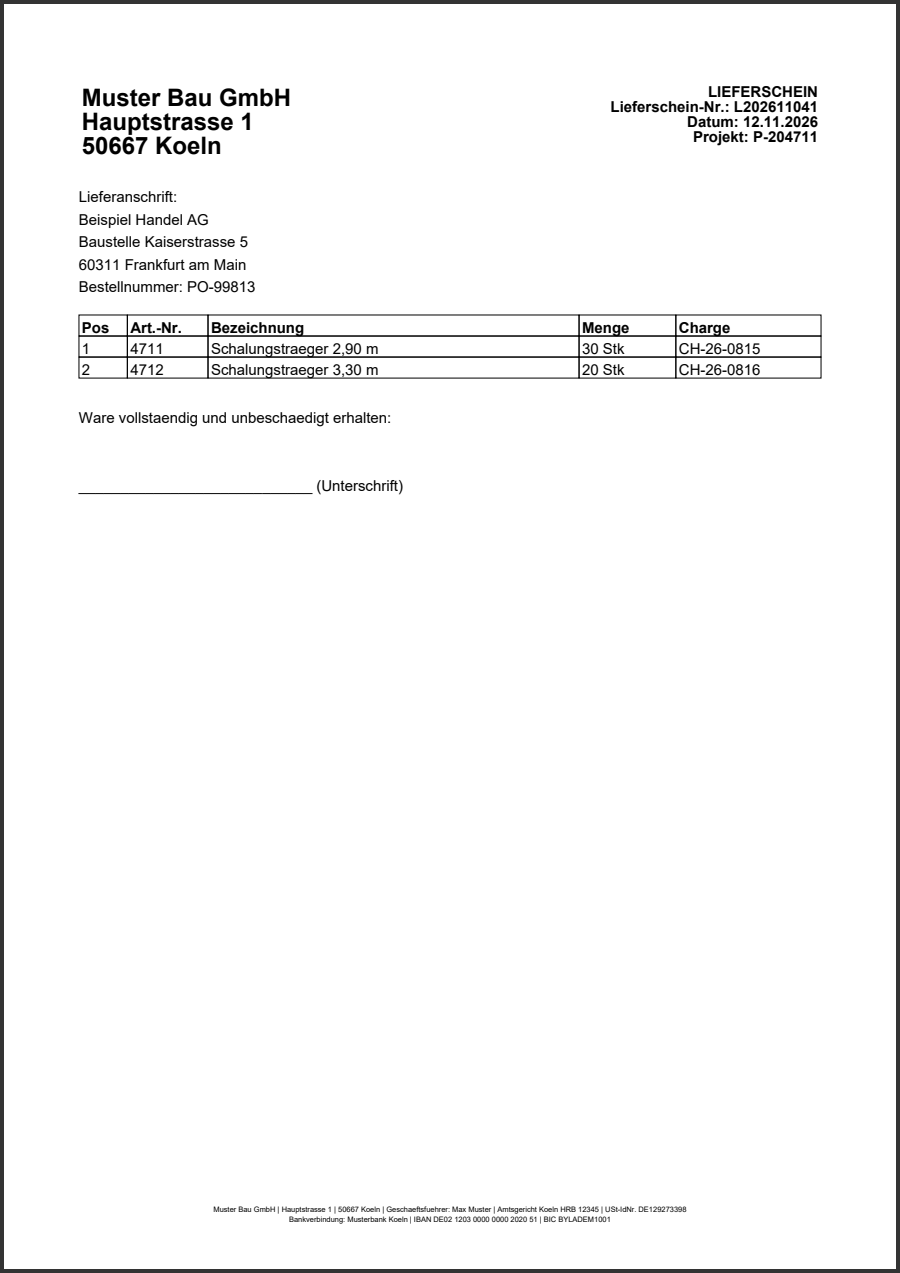
Download the sample delivery note (PDF). It has the delivery note number L202611041 at the top right and a batch number for each item in the column Charge: CH-26-0815 for item 4711 and CH-26-0816 for item 4712.
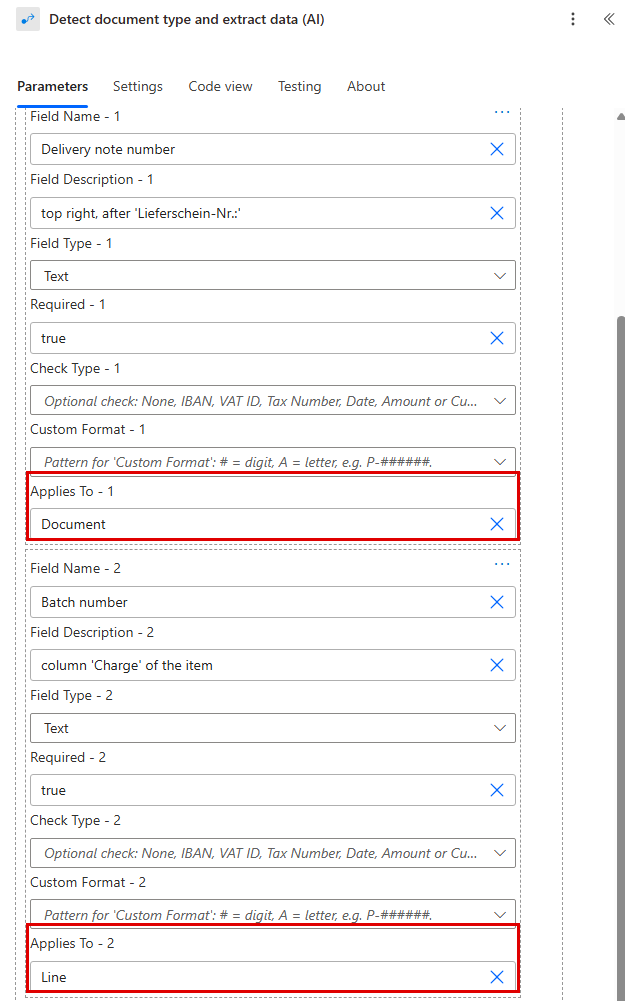
We read the delivery note number once for the document and the batch number for every item:
- Delivery note number: Field Description
top right, after 'Lieferschein-Nr.:', Applies ToDocument - Batch number: Field Description
column 'Charge' of the item, Applies ToLine
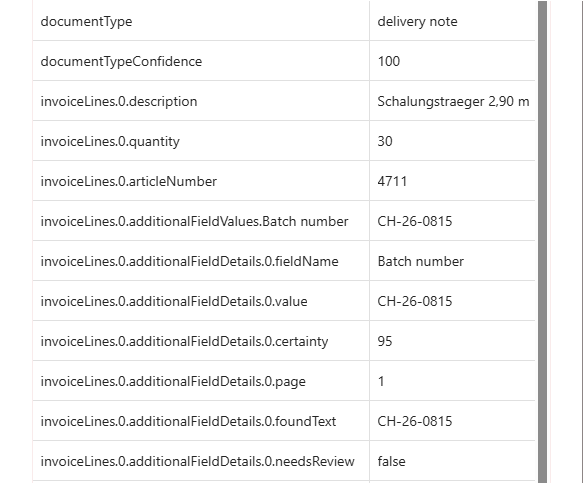
The action returns Document Type delivery note. In Invoice Items each item has its description, quantity and article number, and its own Additional Field Values with the batch number:
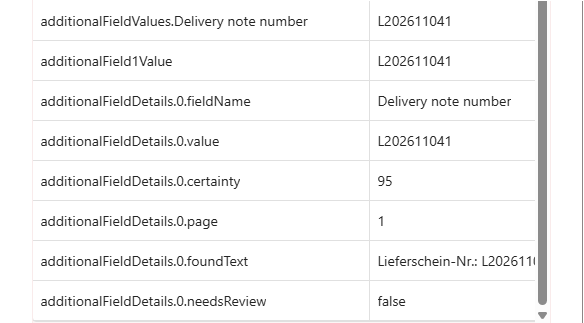
The document field is at the top level: Additional Field 1 Value is L202611041, and Additional Field Details shows the text it was read from, Lieferschein-Nr.: L202611041.
To use the batch numbers, add an Apply to each over Invoice Items, as shown on the page of Detect invoice data with custom fields (AI), with the expression items('Apply_to_each')?['additionalFieldValues']?['Batch number'].
E-invoices: values from the XML
- Data Source Mode: where the values come from. Auto (the default) reads an e-invoice from its XML (a PDF with embedded ZUGFeRD or Factur-X XML, or an XRechnung as CII or UBL XML file) and asks the AI only for what the XML does not have: your own fields, or the invoice lines if the XML has none. A document without valid XML is read by the AI. Always AI reads every document with the AI. XML Only never uses the AI: without valid XML the fields stay empty and Check Status is Error with the code
NoValidXml. An unknown value counts as Auto (noteDataSourceModeDefaulted). Data Source tells where the values came from:AI,XMLorXML and AI. From the XML, Document Type is invoice or credit note with Document Type Confidence 100. Example: XML Only if only e-invoices may be processed and no AI may be used. - With XML Only and no valid e-invoice, Notes says
No valid embedded e-invoice found; with 'XML Only' nothing is read by the AI.and Check Hints has the codeNoValidXml.
Document Type Confidence and the type document
Document Type Confidence says how sure the AI is about the type, from 0 to 100.
- Below 50 the type is too unclear: Document Type becomes
document, and Notes says The document type is unclear; it is returned as 'document'. - Below the threshold of the Review Level (Rarely 60, Normal 80, Often 90), Needs Review is
true. Check Needs Review in your flow and let a person look at these documents. - For document, delivery note and quote request the invoice fields are empty. Your own fields are still returned.
Parameters
| Property | Name | Type | Description |
|---|---|---|---|
documentFile | Document File required | file (base64) | The document as PDF, JPEG or PNG (scan or photo), as XML e-invoice, or as DOCX, XLSX or text file (e.g. TXT, CSV). |
additionalInstructions | Additional Instructions advanced | string | Optional hints for the AI. They can also set the document type, e.g. 'Treat delivery notes with prices as invoice' or 'Only invoice or credit note, otherwise document'. Max 2000 characters. |
additionalFields | Additional Field advanced | array of DtoAdditionalField | Up to 10 own fields to extract from any document type. |
readHeaderAndFooterInDetail | Read Header and Footer in Detail advanced | boolean | If true, the top and bottom of page 1 are also sent zoomed in, so small print like bank details is read better. default: true |
validateStandardFields | Validate Standard Fields advanced | boolean | If true, IBAN, VAT IDs and totals of invoices, credit notes and receipts are checked; problems set 'Needs Review'. default: true |
reviewLevel | Review Level advanced | string (dropdown) | How often values are marked for review: Rarely, Normal or Often. default: "Normal"; dynamic dropdown |
dataSourceMode | Data Source Mode advanced | string (dropdown) | Auto: embedded e-invoice first, AI for the rest. Always AI. XML Only: no AI. default: "Auto"; dynamic dropdown |
Returns
| Property | Name | Type | Description |
|---|---|---|---|
invoiceNumber | Invoice Number | string | Recognized invoice number |
invoiceDate | Invoice Date | string | Recognized invoice date (format: yyyy-MM-dd) |
currencyCode | Currency | string | Recognized currency code (e.g., EUR, USD) |
sellerName | Seller Name | string | Recognized seller company or person name |
sellerStreet | Seller Street | string | Recognized seller street address |
sellerPostcode | Seller Postcode | string | Recognized seller postal code |
sellerCity | Seller City | string | Recognized seller city or locality |
sellerCountry | Seller Country | string | Recognized seller country (ISO code, e.g., DE) |
sellerVatId | Seller VAT ID | string | Recognized seller VAT ID |
buyerName | Buyer Name | string | Recognized buyer company or person name |
buyerStreet | Buyer Street | string | Recognized buyer street address |
buyerPostcode | Buyer Postcode | string | Recognized buyer postal code |
buyerCity | Buyer City | string | Recognized buyer city or locality |
buyerCountry | Buyer Country | string | Recognized buyer country (ISO code, e.g., DE) |
iban | IBAN | string | Recognized bank account IBAN for payment |
paymentDueDate | Payment Due Date | string | Recognized payment due date (format: yyyy-MM-dd) |
totalNetAmount | Total Net Amount | number | Recognized total net amount (without VAT) |
totalVatAmount | Total VAT Amount | number | Recognized total VAT amount |
totalGrossAmount | Total Gross Amount | number | Recognized total gross amount (including VAT) |
invoiceLines | Invoice Items | array of DtoRecognizedInvoiceLineV2 | Recognized line items of the document (invoice lines, or positions of a delivery note, order or quote request) |
needsReview | Needs Review | boolean | True if a check failed (IBAN, VAT ID, totals, own field checks), a required own field is missing, or the AI was not sure enough |
checkStatus | Check Status | string | OK if no check found anything, Check if a value should be looked at, Error if a hard check failed (totals, IBAN, a required field or no XML) |
documentType | Document Type | string | Detected document type: invoice, credit note, receipt, delivery note, quote request, or document if unclear. |
documentTypeConfidence | Document Type Confidence | integer (int32) | How certain the AI is about the document type, from 0 to 100. |
deliveryDate | Delivery Date advanced | string | Recognized delivery date (format: yyyy-MM-dd) |
buyerReference | Buyer Reference advanced | string | Recognized buyer reference or Leitweg-ID (BT-10) |
buyerOrderNumber | Order Number advanced | string | Recognized purchase order number of the buyer (BT-13) |
sellerEmail | Seller Email advanced | string | Recognized seller email address |
buyerVatId | Buyer VAT ID advanced | string | Recognized buyer VAT ID |
bic | BIC advanced | string | Recognized bank identifier code (BIC) |
paymentRecipient | Payment Recipient advanced | string | Recognized name of the payment recipient |
paymentTerm | Payment Term advanced | string | Recognized payment term |
isReadyForEInvoice | Ready for E-Invoice advanced | boolean | Whether the recognized data contains all fields required to create a valid e-invoice (EN 16931). If false, check 'Missing Required Fields' |
missingRequiredFields | Missing Required Fields advanced | array of string | Required e-invoice fields and required own fields that could not be recognized, for example 'Invoice Number (BT-1)' |
notes | Notes advanced | array of string | Notes about the recognition, for example skipped pages or uncertain values |
checkHints | Check Hints advanced | array of DtoCheckHint | One entry per finding with a fixed code, the sentence from Notes and the field it concerns; empty if the status is OK |
dataSource | Data Source advanced | string | Where the values come from: AI (read by the AI), XML (from the e-invoice) or XML and AI (missing fields by AI); empty if nothing was read |
additionalFieldValues | Additional Field Values advanced | object | Values of your own fields with 'Applies To' Document, by field name (line fields are in 'Invoice Items') |
additionalField1Value | Additional Field 1 Value advanced | string | Value of own field 1 in the order of 'Additional Field' (empty for a field with 'Applies To' Line) |
additionalField2Value | Additional Field 2 Value advanced | string | Value of own field 2 in the order of 'Additional Field' (empty for a field with 'Applies To' Line) |
additionalField3Value | Additional Field 3 Value advanced | string | Value of own field 3 in the order of 'Additional Field' (empty for a field with 'Applies To' Line) |
additionalField4Value | Additional Field 4 Value advanced | string | Value of own field 4 in the order of 'Additional Field' (empty for a field with 'Applies To' Line) |
additionalField5Value | Additional Field 5 Value advanced | string | Value of own field 5 in the order of 'Additional Field' (empty for a field with 'Applies To' Line) |
additionalField6Value | Additional Field 6 Value advanced | string | Value of own field 6 in the order of 'Additional Field' (empty for a field with 'Applies To' Line) |
additionalField7Value | Additional Field 7 Value advanced | string | Value of own field 7 in the order of 'Additional Field' (empty for a field with 'Applies To' Line) |
additionalField8Value | Additional Field 8 Value advanced | string | Value of own field 8 in the order of 'Additional Field' (empty for a field with 'Applies To' Line) |
additionalField9Value | Additional Field 9 Value advanced | string | Value of own field 9 in the order of 'Additional Field' (empty for a field with 'Applies To' Line) |
additionalField10Value | Additional Field 10 Value advanced | string | Value of own field 10 in the order of 'Additional Field' (empty for a field with 'Applies To' Line) |
additionalFieldDetails | Additional Field Details advanced | array of DtoAdditionalFieldDetail | Details for each own field with 'Applies To' Document: value, certainty, page, found text and whether it needs review |
Type DtoAdditionalField
| Property | Name | Type | Description |
|---|---|---|---|
fieldName | Field Name | string | Name of the field, e.g. 'Project number'. Used as key in 'Additional Field Values'. |
fieldDescription | Field Description | string | Where to find the value on the document, e.g. 'top right, after Project:'. |
fieldType | Field Type | string (dropdown) | Kind of value: Text, Number, Date or Amount. default: "Text"; dynamic dropdown |
required | Required advanced | boolean | If true, a missing value is listed in 'Missing Required Fields' and marked for review. default: false |
checkType | Check Type advanced | string (dropdown) | Optional check: None, IBAN, VAT ID, Tax Number, Date, Amount or Custom Format. default: "None"; dynamic dropdown |
customFormat | Custom Format advanced | string | Pattern for 'Custom Format': # = digit, A = letter, e.g. P-######. |
appliesTo | Applies To advanced | string (dropdown) | Document = one value per document, Line = one value per line item or table row. default: "Document"; dynamic dropdown |
Type DtoRecognizedInvoiceLineV2
| Property | Name | Type | Description |
|---|---|---|---|
description | Description | string | Recognized description of the invoiced item or service |
quantity | Quantity | number | Recognized quantity of the item |
unitCode | Unit Code | string | Recognized measurement unit (ISO code, e.g., C62 for piece) |
unitPrice | Unit Price | number | Recognized net unit price after line discount, without tax. If it is missing or does not match the line net amount, it is derived from line net amount and quantity (see Notes) |
vatPercent | VAT Percent | number | Recognized VAT rate for the item (e.g., 19 for 19%) |
lineNetAmount | Line Net Amount | number | Recognized net amount of the line |
articleNumber | Article Number | string | Recognized article number of the seller (BT-155) |
grossUnitPrice | Gross Unit Price | number | Recognized unit price before line discount, without tax (BT-148) |
discountPercent | Discount Percent | number | Recognized line discount in percent (e.g., 40 for 40%) |
discountAmount | Discount Amount | number | Recognized discount amount of the whole line, without tax (BT-136) |
additionalFieldValues | Additional Field Values advanced | object | Values of your own fields with 'Applies To' Line for this line, by field name |
additionalFieldDetails | Additional Field Details advanced | array of DtoAdditionalFieldDetail | Details for each own field with 'Applies To' Line for this line: value, certainty, page, found text and whether it needs review |
Type DtoAdditionalFieldDetail
| Property | Name | Type | Description |
|---|---|---|---|
fieldName | Field Name | string | Name of the own field |
value | Value | string | Recognized value (dates as yyyy-MM-dd, amounts with a decimal point) |
certainty | Certainty | integer (int32) | How sure the AI is, from 0 to 100 |
needsReview | Needs Review | boolean | True if the check failed, a required value is missing, or the certainty is below the review level |
page | Page advanced | integer (int32) | Page where the value was found, starting at 1 |
foundText | Found Text advanced | string | Text on the document the value was read from |
Type DtoCheckHint
| Property | Name | Type | Description |
|---|---|---|---|
code | Hint Code | string | Fixed code of the finding, for example TotalsMismatch, IbanInvalid or PagesSkipped |
text | Hint Text | string | The finding as an English sentence (the same as in Notes, except for LowCertainty) |
field | Hint Field | string | The field the finding concerns, for example IBAN or Line 2: Cost Center; empty if it concerns the whole document |
Example request
{
  "documentFile": "<base64-encoded file content>"
}
Example generated from the connector definition.